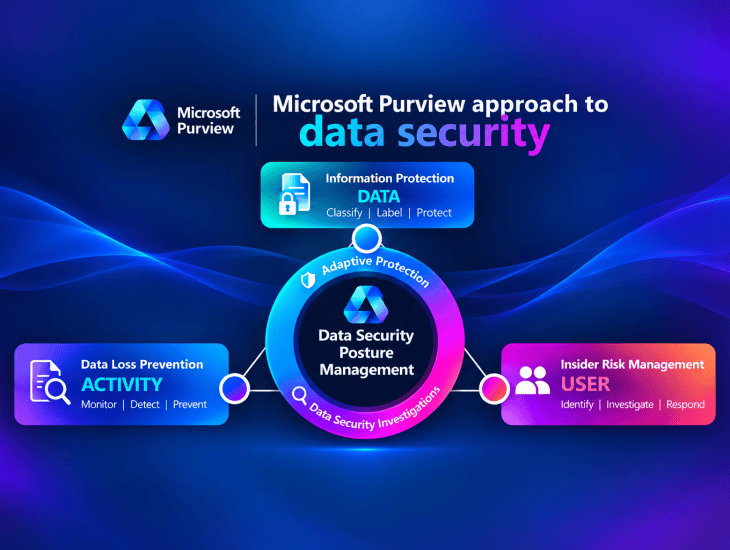
How Microsoft Purview connects DATA, ACTIVITY and USER risk to deliver continuous data security posture management across Microsoft 365, cloud applications and AI agents.
Introduction
Organizations have spent years securing their identities, devices, networks, applications and cloud infrastructure. Yet one of the most important security challenges remains: How do we know whether our sensitive data is actually protected?
Consider a typical enterprise environment.
Sensitive information is distributed across Exchange Online, SharePoint Online, OneDrive, Microsoft Teams, endpoints, cloud applications and business platforms. Employees collaborate with external partners, access documents from multiple devices and increasingly use generative AI to retrieve and process enterprise information.
Even when security controls are deployed, important questions remain:
- Where is our sensitive information stored?
- Who has access to it?
- How is it being used and shared?
- Which activities represent potential data loss?
- Which user behaviors require investigation?
- What information could be exposed through Microsoft 365 Copilot or AI agents?
- How do we measure whether our data security posture is improving?
Microsoft Purview addresses these challenges through an integrated data security architecture.
At its foundation are three interconnected capabilities:
Information Protection — DATA
Data Loss Prevention — ACTIVITY
Insider Risk Management — USER
Microsoft Purview Data Security Posture Management (DSPM) brings these dimensions together with broader data security signals, assessments, investigations and remediation workflows.
The result is a shift from managing isolated security controls toward continuously understanding and reducing data security risks.
1. Understanding the Microsoft Purview Data Security Architecture
Microsoft’s data security architecture can be understood through three fundamental dimensions.
| Dimension | Microsoft Purview capability | Primary question |
|---|---|---|
| DATA | Information Protection | What sensitive information do we have? |
| ACTIVITY | Data Loss Prevention | How is sensitive information being used and shared? |
| USER | Insider Risk Management | Which user behaviors indicate potential data risk? |
| POSTURE | Data Security Posture Management | Where are our most important risks, and what should we improve? |
These capabilities work together, but each has a distinct responsibility.
Information Protection establishes data sensitivity and protection requirements.
DLP evaluates activities against data protection policies.
Insider Risk Management provides context about potentially risky user behavior.
DSPM consolidates relevant signals and guides organizations toward measurable data security outcomes.
This architecture is particularly valuable because a data security incident rarely involves just one dimension.
A sensitive file might be correctly labeled but accessible to too many users. A DLP policy might detect an attempted transfer without explaining the broader pattern of user activity. An insider risk investigation might identify concerning behavior that reveals weaknesses in existing data protection controls.
A mature data security strategy must connect these perspectives.
2. Information Protection: Understanding the DATA
Microsoft Purview Information Protection provides the foundation for identifying, classifying and protecting sensitive information.
Organizations cannot consistently protect information they have not identified or classified.
Information Protection provides capabilities such as:
- Sensitive Information Types (SITs)
- Custom sensitive information types
- Exact Data Match (EDM) classification
- Trainable classifiers
- Sensitivity labels
- Manual and automatic labeling
- Encryption and content markings
- Data classification and activity visibility
Example: Designing a sensitivity label taxonomy
A financial services organization might establish the following classification model.
| Label | Business purpose | Example protection |
|---|---|---|
| Public | Information approved for public distribution | No additional label-based restriction |
| Internal | Routine business information | Internal handling requirements |
| Confidential | Sensitive customer and business information | Restricted access and encryption where appropriate |
The classification model should reflect business requirements rather than simply copying a generic template.
For example, a Confidential label might enforce encryption for selected workloads, while another organization might initially use labels only for classification and DLP conditions.
Sensitivity labels can provide persistent protection for supported content when encryption is configured. However, a label does not automatically resolve excessive SharePoint permissions, inappropriate sharing links or every form of data exposure.
This distinction becomes increasingly important with Microsoft 365 Copilot.
A document can be classified as Confidential and still be accessible to an unnecessarily broad group if the underlying access permissions have not been properly governed.
Architecture principle: Information Protection establishes what the data is and how it should be protected.
3. Data Loss Prevention: Understanding the ACTIVITY
Information Protection tells us what information is sensitive.
Data Loss Prevention helps organizations monitor and control how that information is used.
Microsoft Purview DLP supports different workloads and enforcement scenarios, depending on the configured locations, policy conditions, licensing and technical prerequisites.
Examples include:
| DLP area | Example scenario |
|---|---|
| Exchange Online | Sensitive information sent through email |
| SharePoint Online | Sensitive documents shared with unauthorized recipients |
| OneDrive | Sensitive files exposed through sharing activities |
| Microsoft Teams | Sensitive information in supported chat and channel scenarios |
| Endpoint DLP | Sensitive files copied to USB, printed or uploaded to restricted services |
| Cloud application scenarios | Sensitive data transfers involving supported cloud applications |
| Microsoft 365 Copilot | Supported controls for sensitive data in Copilot interactions |
| Power BI / Fabric | Supported data protection scenarios involving analytics content |
These are not identical policy locations or enforcement engines. Each scenario has its own supported conditions, actions and prerequisites.
Practical DLP example
Consider an employee attempting to upload a confidential customer report to an unauthorized cloud storage service.
The security workflow could involve:
- Information Protection identifies the file as Confidential.
- Endpoint DLP evaluates the attempted upload.
- The DLP policy checks its configured conditions.
- The activity is audited, warned about or blocked according to the applicable rule.
- Security analysts review the alert or activity evidence where available.
The outcome depends on device onboarding, supported applications or browsers, and policy configuration.
DLP can also identify sensitive information using SITs and classifiers even when a document has no sensitivity label.
Why DLP alone is not enough
A DLP alert identifies an activity that matched a policy.
However, the alert may not fully explain whether the activity is isolated, part of a larger pattern, or associated with elevated insider risk.
This is where additional user context becomes valuable.
Architecture principle: DLP protects sensitive information by evaluating activities against security policies.
4. Insider Risk Management: Understanding the USER
Microsoft Purview Insider Risk Management focuses on potentially risky user activities.
Not every data security incident results from a malicious actor.
Some incidents involve accidental disclosure, inappropriate sharing, excessive downloads or activities that require further investigation.
Insider Risk Management helps authorized teams evaluate relevant indicators and patterns.
Examples include:
- Unusual sensitive file downloads
- Potentially suspicious data transfers
- Risk indicators associated with configured departing-user scenarios
- Sequences of activities that may indicate potential data exfiltration
- Policy-defined behaviors requiring further review
Insider Risk Management is not simply another DLP solution.
DLP focuses on policy-matching activities.
Insider Risk Management helps identify potential user-related risk through correlated signals and configured analytics.
Privacy and governance
Insider Risk Management must be implemented with strong governance.
Microsoft includes privacy-oriented capabilities such as pseudonymization by default, role-based access controls and audit logging.
Organizations should also establish appropriate investigation procedures, legal review, data minimization practices and separation of duties.
The goal is to identify meaningful data security risks while respecting employee privacy and organizational requirements.
Architecture principle: Insider Risk Management adds behavioral context to data security decisions.
5. Adaptive Protection: Connecting USER Risk to Security Enforcement
Adaptive Protection connects insider risk levels with protection controls.
Traditional DLP policies typically evaluate activities against configured conditions.
Adaptive Protection adds a dynamic risk dimension.
Instead of applying the same restrictions to every user, organizations can configure controls that respond to assigned insider risk levels.
Example policy model
| Insider risk level | Example security response |
|---|---|
| Minor | Maintain standard controls and monitoring |
| Moderate | Apply additional warnings or selected restrictions |
| Elevated | Apply stronger controls for selected sensitive data activities |
These are illustrative policy choices, not mandatory default configurations.
Adaptive Protection integrations
Microsoft documents Adaptive Protection integrations with:
Microsoft Purview Data Loss Prevention
Apply DLP protections based on insider risk levels.
Microsoft Purview Data Lifecycle Management — Preview
Support specific retention-related responses associated with elevated insider risk.
Microsoft Entra Conditional Access — Preview
Apply access decisions based on supported insider risk conditions.
For example, an organization might restrict access to selected sensitive applications or SharePoint sites when a user reaches an elevated insider risk level.
This is an important architectural development.
Adaptive Protection extends the relationship between user risk and security enforcement beyond traditional DLP alone.
However, organizations must review preview status, licensing, prerequisites and supported scenarios before designing production controls.
Architecture principle: Adaptive Protection uses insider risk context to dynamically adjust supported security controls.
6. Data Security Posture Management: Connecting the Security Pillars
Now consider an organization that has already implemented sensitivity labels, DLP policies and Insider Risk Management.
Does that automatically mean its sensitive data is adequately protected?
Not necessarily.
The organization may still have:
- Large volumes of unlabeled sensitive information
- Overshared SharePoint sites
- Incomplete DLP coverage
- Unprotected data repositories
- Excessive permissions
- Inadequate AI application visibility
- Unresolved data security recommendations
Microsoft Purview DSPM addresses these challenges by providing a broader view of data security posture.
DSPM is designed to help organizations discover, protect and investigate data risks across supported environments.
It brings together insights from Information Protection, DLP, Insider Risk Management and Data Security Investigations.
It also extends visibility into supported AI applications, agents and integrated third-party environments.
DSPM is not a replacement for existing controls
This distinction is essential.
DSPM does not replace sensitivity labels, DLP policies or Insider Risk Management.
Instead, it helps organizations determine:
What risks exist?
Which controls are missing or insufficient?
Which remediation actions should be prioritized?
How is the security posture changing over time?
The focus shifts from individual product configuration toward measurable data security outcomes.
7. The Evolution from DSPM and DSPM for AI to Unified DSPM
Microsoft Purview DSPM has evolved significantly.
Earlier experiences distinguished between broader Data Security Posture Management and DSPM for AI.
DSPM for AI focused on data security risks associated with generative AI applications and interactions.
The newer unified DSPM experience brings traditional data security and AI-related risks into a more integrated model.
Microsoft documentation now refers to the earlier experiences as:
- DSPM (classic)
- DSPM for AI (classic)
The current DSPM experience introduces broader coverage, guided security objectives, posture metrics and integrated remediation workflows.
Why this matters
Organizations should not manage AI data security as an isolated initiative.
AI applications and agents interact with the same sensitive information already governed by classification, permissions, DLP and information protection policies.
For example, a SharePoint oversharing issue may represent a traditional data exposure risk and a Copilot readiness concern at the same time.
Unified DSPM helps security teams evaluate these risks within a common posture management approach.
8. Exploring the Unified DSPM Experience
The unified DSPM experience introduces several important operational capabilities.
8.1 Posture Dashboard
The Posture dashboard provides an overview of data security risks, metrics, trends and priority objectives.
It helps security teams understand their current posture and identify areas requiring attention.
Rather than reviewing disconnected product dashboards, administrators can evaluate broader data security conditions.
8.2 Data Security Objectives
Security objectives organize remediation around specific outcomes.
Examples include:
- Prevent oversharing of sensitive data
- Prevent data exposure in Copilot interactions
- Prevent exfiltration to risky locations
- Discover sensitive information across the organization
Each objective can provide relevant insights, recommendations and guided actions.
This represents a significant architectural shift.
Instead of asking which Microsoft Purview feature should be configured next, the security team can begin with the business risk it wants to reduce.
8.3 Asset Explorer
Asset Explorer helps security teams investigate data assets, classification coverage and protection status across supported sources.
This can support questions such as:
- Which sensitive information remains unlabeled?
- Which workloads contain sensitive data?
- Where are protection gaps concentrated?
- Which assets require further investigation?
Coverage varies by workload and integration. Microsoft and third-party data sources do not necessarily expose identical levels of detail.
8.4 AI Observability
AI Observability provides visibility into AI applications and agents and their associated data security risks.
Depending on supported integrations and configuration, it can help organizations investigate:
- AI applications and agents in use
- Sensitive interactions
- Potential oversharing
- Suspicious access patterns
- Potential data exfiltration
- Relevant governance policies
This is particularly important as organizations expand from Microsoft 365 Copilot into custom agents and third-party AI platforms.
8.5 Data Risk Assessments
Data Risk Assessments help organizations identify potential oversharing and access-related risks.
Microsoft documents a default assessment that runs weekly against the 100 most-used SharePoint sites.
Administrators can also initiate custom assessments for supported users, sites and Fabric workspaces.
The results can guide remediation decisions.
8.6 Reports and Continuous Improvement
DSPM reporting helps organizations evaluate sensitive data usage, policy coverage, user and agent risk signals, and posture trends.
This supports a continuous improvement model.
A security posture assessment should not end with a list of recommendations.
It should result in assigned remediation actions, implementation evidence and measurable improvements.
9. Practical Scenario: Identifying Overshared Data Before Microsoft 365 Copilot Deployment
Consider a financial services organization preparing to deploy Microsoft 365 Copilot.
The organization has thousands of SharePoint sites and OneDrive accounts.
Some sites contain confidential customer records, internal financial reports and sensitive contracts.
Over time, certain sites have accumulated excessive permissions or overly broad sharing links.
The risk
Microsoft 365 Copilot uses existing access permissions when retrieving enterprise content.
Consequently, excessive permissions can increase the amount of sensitive information accessible through Copilot experiences.
Copilot does not need to bypass SharePoint permissions for this to become a security concern.
The underlying problem is that the permissions themselves may be too broad.
Using DSPM to investigate
The security team can use Data Risk Assessments to identify potentially overshared content.
A practical assessment workflow could include:
Step 1 — Discover
Identify SharePoint sites containing sensitive information and broad sharing configurations.
Step 2 — Assess
Review the classification status, exposure indicators and relevant sharing permissions.
Step 3 — Prioritize
Focus on highly sensitive content with excessive access.
Step 4 — Remediate
Depending on the findings and supported controls, remediation could include:
- Reviewing SharePoint permissions
- Removing unnecessary sharing links
- Conducting site access reviews
- Applying sensitivity labels
- Configuring auto-labeling policies
- Implementing relevant DLP controls
- Using SharePoint Restricted Content Discovery where appropriate
- Applying retention policies to content that no longer needs to be retained
Step 5 — Reassess
Run an appropriate follow-up assessment and compare the findings.
Important technical distinction
SharePoint Restricted Content Discovery limits discovery through supported Copilot and organization-wide search experiences. It is not a substitute for correcting the underlying access permissions.
Similarly, a DLP policy restricting Copilot processing of selected labeled content is not the same as revoking a user’s access to the source document.
A mature remediation strategy must distinguish between:
- Content discovery restrictions
- Data access permissions
- Information protection
- DLP enforcement
- Content lifecycle management
These controls are complementary, not interchangeable.
10. Data Security Investigations: Moving from Posture to Incident Analysis
DSPM helps identify systemic data risks.
However, organizations must also investigate specific incidents involving sensitive information.
Microsoft Purview Data Security Investigations supports deeper investigation of potential data security incidents, including AI-assisted content analysis.
It can help authorized investigators search, collect and analyze relevant information.
Integration with DSPM
Microsoft documents scenarios in which potential data exfiltration findings from DSPM can be escalated into Data Security Investigations.
This allows investigators to move from a posture finding to a deeper examination of potentially exposed information.
Integration with Endpoint DLP
When Endpoint DLP evidence collection is correctly configured, Data Security Investigations can use captured file evidence from supported endpoint activities.
Examples include files involved in:
- Copying to removable storage
- Printing
- Uploading to cloud destinations
- Access through restricted applications
The availability of evidence depends on prerequisites such as device onboarding, DLP configuration, evidence collection settings, storage and retention.
The feature should not be assumed to capture every file or every endpoint event automatically.
Investigation workflow
A typical investigation can follow these stages:
- Identify a potentially significant data security incident.
- Review the triggering activity and available audit evidence.
- Search for relevant content.
- Add relevant material to an investigation scope.
- Analyze the evidence using available investigation capabilities.
- Determine the potential impact.
- Document findings and recommended remediation.
- Improve preventive controls where necessary.
Architecture principle: DSPM identifies broader risk patterns; Data Security Investigations supports deeper analysis of specific incidents.
11. Extending Data Security to AI Applications and Agents
Generative AI introduces additional ways for enterprise information to be accessed and processed.
Organizations must understand not only what data employees can access but also how AI applications and agents interact with that information.
Common AI-related data risks
Oversharing
Sensitive content is accessible to more users than intended.
Sensitive prompts
Users submit confidential information to AI applications.
Sensitive responses
AI-generated responses include information requiring additional protection.
Shadow AI
Employees use AI services outside approved governance processes.
Excessive agent permissions
AI agents are granted broader access than required for their business function.
Insufficient observability
Security teams lack adequate visibility into supported AI activities and sensitive interactions.
Building an AI data security architecture
A practical architecture should connect:
| Security requirement | Relevant capabilities |
|---|---|
| Identify sensitive data | Information Protection, SITs, classifiers |
| Reduce excessive access | SharePoint governance and access reviews |
| Control sensitive data activities | DLP and supported Copilot controls |
| Evaluate user-related risk | Insider Risk Management |
| Adapt selected enforcement | Adaptive Protection |
| Understand AI activity | DSPM AI Observability and applicable integrations |
| Assess exposure | DSPM Data Risk Assessments |
| Investigate incidents | Data Security Investigations and audit capabilities |
The central principle is simple:
AI security must be built on a strong data security foundation.
Deploying AI-specific controls without addressing existing classification and access governance weaknesses will leave important risks unresolved.
12. Recommended Enterprise Implementation Approach
A successful Microsoft Purview deployment should be organized around business risk, architecture decisions and measurable outcomes.
I recommend the following implementation approach.
| Phase | Workstream | Key activities | Deliverables |
|---|---|---|---|
| 1 | Discovery and assessment | Identify data sources, existing controls, sensitive data and exposure | Assessment report and risk register |
| 2 | DSPM baseline | Review posture, objectives and initial recommendations | Posture baseline |
| 3 | Information Protection | Define taxonomy, SITs, labels and protection requirements | Classification and labeling design |
| 4 | DLP | Configure, simulate, test and progressively enforce policies | DLP policy matrix and test results |
| 5 | Insider Risk | Define approved scenarios, roles and privacy controls | Insider Risk design |
| 6 | Adaptive Protection | Connect supported controls to insider risk levels | Adaptive Protection policy design |
| 7 | AI security | Assess Copilot access, oversharing, AI applications and agents | AI readiness assessment |
| 8 | Investigations | Establish authorized investigation procedures | Investigation runbooks |
| 9 | Remediation | Address high-priority exposure and policy gaps | Remediation tracker |
| 10 | Continuous improvement | Review metrics, validate changes and reassess | Posture reports and improvement roadmap |
Why DSPM should start early
DSPM should not be treated only as the final phase of a Purview implementation.
An initial posture assessment can help identify which controls should be prioritized.
For example, an organization may discover that oversharing and excessive permissions represent a greater immediate risk than implementing additional sensitivity label configurations.
That finding should influence the deployment roadmap.
The recommended approach is therefore iterative:
Assess → Prioritize → Design → Implement → Validate → Reassess
13. Measuring Data Security Posture Improvement
A data security program should demonstrate measurable progress.
Useful indicators include:
| Metric | What it helps measure |
|---|---|
| Sensitive data classification coverage | Visibility into identified sensitive information |
| Labeling coverage | Adoption of information protection controls |
| DLP policy coverage | Protection across targeted workloads |
| DLP false-positive rate | Policy quality and operational impact |
| Overshared sensitive items | Exposure through excessive access |
| High-risk sharing links | Potentially inappropriate sharing |
| Remediation completion | Progress against identified findings |
| AI application visibility | Coverage of supported AI environments |
| Investigation response time | Operational effectiveness |
| Posture trend | Overall direction of data risk management |
These indicators should be interpreted carefully.
For example, an increase in detected sensitive data does not necessarily mean the organization’s security posture has worsened. It may indicate that discovery coverage has improved.
Similarly, fewer DLP alerts do not automatically prove that data loss risk has decreased.
Meaningful posture management requires both technical metrics and business context.
14. Architecture Best Practices
Based on the relationship between Information Protection, DLP, Insider Risk Management and DSPM, several design principles are particularly important.
1. Start with business risk, not product configuration
Understand which data security outcomes matter most before deploying additional controls.
2. Keep classification simple and meaningful
Sensitivity labels should reflect business handling requirements and be understandable to users.
3. Validate DLP policies before broad enforcement
Use supported simulation, audit and pilot approaches to reduce false positives and operational disruption.
4. Address access governance separately
Sensitivity labels and DLP do not eliminate the need for SharePoint permission reviews, access governance and least-privilege principles.
5. Separate administration from investigation
Apply appropriate role-based access controls to Purview administration, Insider Risk Management and Data Security Investigations.
6. Treat Adaptive Protection as a risk-based capability
Do not introduce dynamic restrictions without clear risk definitions, validation and operational procedures.
7. Include AI and agents in the data security scope
Evaluate sensitive interactions, application governance and agent permissions alongside traditional data security controls.
8. Prioritize remediation through DSPM
Use objectives, assessments and recommendations to focus on meaningful exposure reduction.
9. Track outcomes, not only deployed policies
The number of configured policies is not a sufficient measure of security maturity.
10. Reassess continuously
Data access, collaboration patterns and AI usage change over time. Security posture management must evolve with them.
15. The Bigger Picture: From Data Protection to Data Risk Management
The most important architectural change is not the introduction of another Microsoft Purview dashboard.
It is the shift in how organizations approach data security.
Historically, data security programs often focused on deploying individual controls:
- Create sensitivity labels.
- Configure DLP policies.
- Enable Insider Risk Management.
- Review alerts.
- Investigate incidents.
These activities remain necessary.
However, unified DSPM introduces a broader operating model focused on data security outcomes.
Organizations can begin with a risk objective, understand the relevant exposure, identify the appropriate controls and track remediation progress.
This creates a more connected relationship between data discovery, preventive protection, user risk, AI observability and incident investigation.
It also provides a clearer way to communicate data security priorities to business stakeholders.
Instead of reporting only that ten DLP policies have been deployed, a security architect can explain which risks those policies address, what exposure remains and how the organization plans to improve.
That is a more meaningful measure of security maturity.
Conclusion
Microsoft Purview’s data security architecture brings together three fundamental dimensions:
DATA — Information Protection
Identify, classify and protect sensitive information.
ACTIVITY — Data Loss Prevention
Monitor and control sensitive data usage and sharing.
USER — Insider Risk Management
Identify and investigate relevant user-related risk indicators.
Adaptive Protection connects insider risk levels to supported security controls.
Data Security Investigations enables deeper analysis of suspected data security incidents.
And at the center, Data Security Posture Management (DSPM) provides a unified approach to understanding, prioritizing and reducing data security risks.
With the evolution toward unified DSPM, this architecture increasingly extends to AI applications, Microsoft 365 Copilot, AI agents and supported third-party environments.
For organizations adopting AI, the message is clear:
A secure AI strategy begins with a secure data foundation.
The objective is no longer simply to classify documents, deploy DLP policies or investigate individual alerts.
It is to continuously understand where sensitive data resides, who can access it, how it is being used, and what actions will most effectively reduce exposure.
That is the direction of modern data security architecture with Microsoft Purview.
Official Microsoft Documentation
The following Microsoft Learn resources provide additional technical guidance:
- Microsoft Purview Data Security Posture Management — Overview
- Microsoft Purview DSPM — Application and capabilities
- Migrating from classic DSPM experiences
- Data Risk Assessments and oversharing
- Microsoft Purview Data Security Solutions
- Microsoft Purview Adaptive Protection
- Microsoft Purview Data Security Investigations
- Microsoft Learn — Reduce Data Exposure Risk with DSPM
Product capabilities, licensing, preview status and supported workloads may change. Validate technical requirements against current Microsoft documentation before implementing production configurations.

