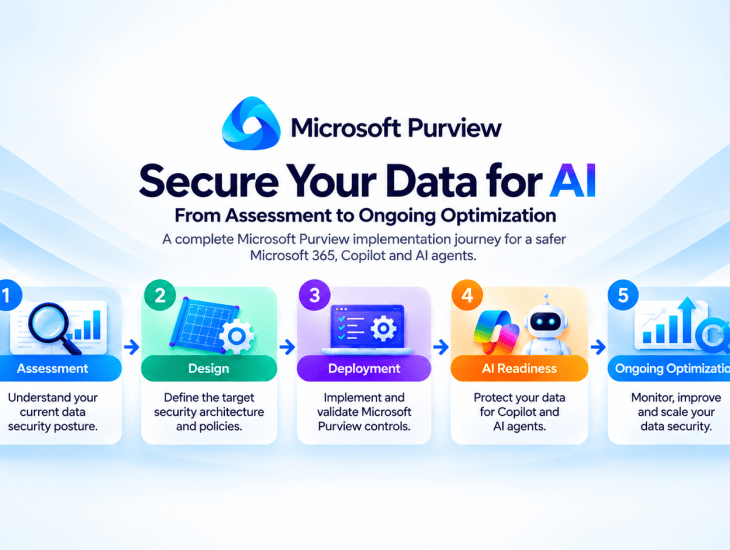
A practical, five-phase deployment framework for Microsoft Purview Information Protection, Data Loss Prevention (DLP), Data Security Posture Management (DSPM), Microsoft 365 Copilot and AI agents.
Introduction
As organizations accelerate the adoption of Microsoft 365 Copilot, generative AI and autonomous AI agents, data security is becoming one of the most important priorities for cybersecurity teams.
Traditional security strategies have focused heavily on protecting identities, endpoints, networks and applications. While these controls remain essential, organizations must also understand where sensitive information resides, who can access it, how it is shared and how AI-powered applications interact with it.
This is where Microsoft Purview plays a critical role.
Microsoft Purview provides an integrated portfolio of data security, governance and compliance capabilities, including:
- Microsoft Purview Information Protection
- Microsoft Purview Data Loss Prevention (DLP)
- Microsoft Purview Endpoint DLP
- Microsoft Purview Data Security Posture Management (DSPM)
- Microsoft Purview Insider Risk Management
- Microsoft Purview Audit
- Microsoft Purview eDiscovery
- Microsoft Purview Data Lifecycle Management
However, implementing Microsoft Purview successfully requires more than creating sensitivity labels or configuring a few DLP policies.
A successful deployment requires a structured approach that aligns technical controls with business requirements, regulatory obligations, user productivity and emerging AI security risks.
In this article, I will walk through the five phases I use to structure an end-to-end Microsoft Purview implementation:
Assessment → Design → Deployment → AI Readiness → Ongoing Optimization
This is a practical consulting delivery framework rather than an official Microsoft-mandated sequence. Some activities, particularly AI readiness and governance, should begin early and continue throughout the project.
Phase 1: Microsoft Purview Security Assessment
Objective: Understand the Current Data Security Posture
Before implementing Microsoft Purview, the first step is to understand the organization’s existing environment, identify security gaps and evaluate how sensitive information is currently protected.
An assessment establishes the baseline against which future improvements can be measured.
Step 1: Define the Assessment Scope
Begin by identifying the Microsoft 365 workloads, users, data repositories and business processes included in the assessment.
Typical workloads include:
- Exchange Online
- SharePoint Online
- OneDrive for Business
- Microsoft Teams
- Windows endpoints
- On-premises file shares
- Supported cloud applications
- Microsoft 365 Copilot and connected AI applications
During the kickoff workshop, identify business stakeholders, technical owners, compliance requirements and existing security challenges.
For example, a financial services organization might want to understand whether employees can accidentally share confidential customer information outside the organization.
Step 2: Review Microsoft 365 Licensing
Evaluate the organization’s existing licenses and determine which Microsoft Purview capabilities are available.
Common licensing considerations include:
- Microsoft 365 E3 and E5
- Office 365 E3 and E5
- Microsoft Purview add-on licenses
- Microsoft Defender for Endpoint licensing
- Microsoft 365 Copilot licensing
- SharePoint Advanced Management entitlements
- Additional AI and agent governance licensing
Licensing should be validated per feature and user. Microsoft 365 E5 does not automatically include every newly introduced AI or agent security capability.
Step 3: Review Existing Purview Configuration
Navigate to the Microsoft Purview portal:
Review the following components.
Information Protection
- Existing sensitivity labels
- Label publishing policies
- Default labeling configurations
- Mandatory labeling
- Automatic labeling
- Encryption and content marking settings
Data Loss Prevention
- Existing DLP policies
- DLP rules and conditions
- Workload coverage
- Policy modes and enforcement
- Alerts, notifications and overrides
Data Classification
- Built-in Sensitive Information Types
- Custom Sensitive Information Types
- Trainable classifiers
- Sensitive data discovery
Data Security Posture Management
- Data security objectives
- Sensitive data exposure
- Oversharing risks
- Data risk assessments
- Available remediation recommendations
Audit and Insider Risk
- Audit configuration
- Relevant retention settings
- Existing Insider Risk policies
- Investigation procedures and authorized roles
Use least-privilege, workload-specific roles wherever possible. Global Administrator should not be the default role for an assessment.
Step 4: Discover Sensitive Data
One of the most important assessment activities is identifying where sensitive information resides.
Use the appropriate Microsoft Purview discovery tools, such as DSPM, Content Explorer and Activity Explorer, subject to licensing, role permissions and workload support.
Typical questions include:
- Where is sensitive financial information stored?
- Which SharePoint sites contain confidential documents?
- Are sensitive documents classified and labeled?
- Are sensitive files accessible through overly broad permissions?
- Are employees transferring sensitive information to unmanaged locations?
- Which data repositories are not currently monitored?
For on-premises repositories, evaluate whether the Microsoft Purview Information Protection scanner is appropriate for discovery and labeling. Do not confuse scanner capabilities with cloud or endpoint DLP enforcement.
Step 5: Identify Security Gaps
Document findings using a structured risk register.
| Finding | Risk | Recommendation | Priority |
|---|---|---|---|
| No sensitivity labels | Inconsistent data classification | Implement labeling taxonomy | High |
| Exchange-only DLP | Incomplete workload protection | Expand DLP coverage | High |
| Excessive SharePoint permissions | Sensitive data exposure | Remediate oversharing | High |
| No Endpoint DLP | Uncontrolled endpoint data movement | Deploy Endpoint DLP | High |
| Limited AI security visibility | Unknown AI-related data risks | Implement DSPM assessment | High |
The assessment should distinguish between confirmed security gaps, potential risks and areas requiring further validation.
Phase 1 Deliverables
- Microsoft Purview Current-State Assessment
- Licensing and Prerequisites Review
- Data Security Gap Analysis
- Risk Register
- Quick Wins
- Remediation Roadmap
- Executive Summary
Recommended effort: Approximately 5–10 consulting days for a moderately scoped assessment.
Phase 2: Microsoft Purview Architecture and Security Design
Objective: Define the Target Data Security Architecture
Once the assessment is complete, the next step is designing the target security controls.
The design should reflect business requirements, information classification, regulatory obligations and operational processes.
Step 1: Design the Sensitivity Label Taxonomy
Start by defining how the organization classifies information.
For example:
| Sensitivity Label | Description | Typical Content |
|---|---|---|
| Public | Approved for public distribution | Marketing materials |
| Internal | Intended for internal business use | Operational documents |
| Confidential | Sensitive business information | Financial records and contracts |
The number of labels should reflect business needs. Adding unnecessary labels or sublabels can make classification more difficult for users.
For each label, determine:
- Applicable content types
- Label ownership
- Encryption requirements
- Content markings
- Default labeling behavior
- Mandatory labeling requirements
- Downgrade justification requirements
- Automatic labeling opportunities
A sensitivity label does not automatically prevent every unauthorized sharing scenario. Protection depends on the configured label settings, access permissions and applicable DLP controls.
Step 2: Design Sensitive Information Types
Microsoft Purview includes built-in Sensitive Information Types for detecting different categories of information.
Organizations can also create custom SITs for business-specific data.
Examples include:
- Customer identifiers
- Internal contract numbers
- Employee identifiers
- Financial reference numbers
- Business-specific confidential information
Custom SIT design should consider primary patterns, supporting evidence, confidence levels, thresholds and false-positive reduction.
Test the detection logic before using it in production policies.
Step 3: Design the DLP Architecture
A comprehensive DLP design should cover the relevant data movement scenarios across supported workloads.
| DLP Workload | Protection Scenario |
|---|---|
| Exchange Online | Prevent unauthorized disclosure through email |
| SharePoint Online | Protect sensitive files and sharing activities |
| OneDrive | Control sensitive document exposure |
| Microsoft Teams | Detect supported sensitive information sharing |
| Endpoint DLP | Monitor or restrict sensitive file activities |
| Cloud App DLP | Protect data in supported cloud application scenarios |
| Microsoft 365 Copilot | Restrict supported sensitive content processing scenarios |
| Network DLP | Apply supported controls to network traffic through eligible integrations |
Not all DLP conditions, actions or licensing requirements are identical across these locations.
For each DLP policy, define:
- Business use case
- Workload location
- Sensitive information detection
- Rule conditions
- Exceptions
- Audit or enforcement action
- User notification
- Alert configuration
- Test scenarios
- Policy owner
Step 4: Design Role-Based Access Control
Administrative permissions should follow the principle of least privilege.
Separate responsibilities across:
- Purview administrators
- Information Protection administrators
- DLP administrators and analysts
- Audit investigators
- Insider Risk investigators
- eDiscovery teams
- SharePoint administrators
- Business data owners
Use the relevant Microsoft Purview role groups and workload-specific permissions.
Where supported, administrative units can help scope access. However, administrative unit support must be verified individually for each workload.
Step 5: Design the Deployment Strategy
I recommend a phased deployment:
Lab → Pilot → Controlled Rollout → Production → Optimization
The pilot should include representative users, workloads and business processes.
Avoid immediately enforcing restrictive DLP policies across the entire organization.
Phase 2 Deliverables
- High-Level Design
- Low-Level Design
- Sensitivity Label Design Workbook
- DLP Policy and Rules Matrix
- Custom SIT Design
- RBAC and Permissions Matrix
- Deployment Plan
- UAT Test Plan
Recommended effort: Approximately 5–10 consulting days.
Phase 3: Microsoft Purview Technical Deployment
Objective: Implement and Validate Data Security Controls
This phase transforms the approved architecture into operational security controls.
Step 1: Prepare the Environment
Before implementation:
- Confirm licenses.
- Validate administrative permissions.
- Define pilot users and groups.
- Check existing policies for conflicts.
- Verify endpoint onboarding.
- Confirm business-owner approvals.
- Prepare synthetic test data.
- Establish rollback and exception procedures.
Step 2: Configure Sensitivity Labels
In Microsoft Purview:
Information Protection → Sensitivity labels
Create the approved labels and configure the relevant settings.
Next, create a label publishing policy and target the pilot population.
Test label visibility and application in supported Microsoft 365 applications, including Word, Excel, PowerPoint and Outlook.
Validate policy propagation before troubleshooting apparent inconsistencies.
Step 3: Configure Custom Sensitive Information Types
Navigate to:
Information Protection → Classifiers → Sensitive info types
Create the approved custom SITs and test them with representative samples.
Test both positive and negative scenarios to measure detection accuracy.
Step 4: Deploy Microsoft 365 DLP Policies
Navigate to:
Data Loss Prevention → Policies
For each approved use case:
- Create the DLP policy.
- Select the supported locations.
- Configure detection conditions.
- Define rule thresholds and exceptions.
- Configure notifications and alerts.
- Start in simulation mode.
- Analyze policy matches.
- Tune false positives.
- Obtain business approval.
- Enable enforcement progressively.
Simulation is important because poorly designed DLP policies can disrupt legitimate business operations.
Step 5: Implement Endpoint DLP
Endpoint DLP extends data loss prevention to supported endpoint activities.
Typical scenarios include:
- Copying sensitive files to removable storage
- Printing sensitive documents
- Uploading sensitive files to restricted cloud services
- Copying sensitive information through supported clipboard activities
- Accessing sensitive files through restricted applications
Before configuring Endpoint DLP, verify that devices are correctly onboarded and meet the supported operating system and browser requirements.
A device already correctly onboarded to Microsoft Defender for Endpoint may satisfy the relevant Purview onboarding integration prerequisites. Intune enrollment alone does not establish this.
Create policies for the Devices location and test supported activities in audit mode before enabling restrictions.
Step 6: Perform User Acceptance Testing
Testing should confirm that controls work as designed.
| Test Scenario | Expected Result |
|---|---|
| Apply Confidential label | Label applied successfully |
| Send sensitive information externally | Relevant DLP policy detects activity |
| Copy sensitive file to USB | Endpoint DLP audits or blocks as configured |
| Share sensitive document externally | Applicable DLP policy triggers |
| Use an approved business exception | Policy behaves according to the approved exception |
| Remove or downgrade a label | Applicable justification requirements are enforced |
Document the results, evidence, defects, remediation and final business acceptance.
Step 7: Production Rollout
After successful UAT:
- Expand policies by department or business unit.
- Enable enforcement for approved rules.
- Communicate user-facing changes.
- Monitor incidents and false positives.
- Review exceptions.
- Transfer operational knowledge to the support team.
Phase 3 Deliverables
- Configured Microsoft Purview environment
- Implemented sensitivity labels
- Custom SITs
- DLP policies
- Endpoint DLP configuration
- UAT results
- Production rollout documentation
- Administrative runbooks
Recommended effort: Approximately 15–30 consulting days, depending on scope.
Phase 4: Microsoft Purview AI Readiness
Objective: Protect Sensitive Data Before and During AI Adoption
AI readiness is becoming an increasingly important part of Microsoft Purview deployments.
Microsoft 365 Copilot can make information more discoverable by using content that users are already authorized to access.
Consequently, existing oversharing, excessive permissions and weak data classification practices may become more visible when organizations introduce AI.
Step 1: Establish the AI Data Security Baseline
Begin by identifying:
- Microsoft 365 Copilot users
- AI applications in scope
- Connected data repositories
- Existing sensitive information exposure
- SharePoint and OneDrive sharing risks
- Agent data sources and tool permissions
- Existing DLP and labeling controls
Step 2: Implement Microsoft Purview DSPM
Open Data Security Posture Management in the Microsoft Purview portal.
Review the available setup tasks and complete the relevant prerequisites.
Depending on the environment, this may involve:
- Validating permissions and licensing
- Reviewing data discovery coverage
- Enabling supported assessment capabilities
- Reviewing sensitive data insights
- Configuring supported AI interaction visibility
- Identifying data security objectives
- Prioritizing recommended remediation actions
Use the current unified DSPM experience where available.
Step 3: Assess Sensitive Data Oversharing
Identify sensitive content exposed through overly broad permissions or sharing links.
Common scenarios include:
- Organization-wide access to confidential files
- Anonymous sharing links
- Excessive SharePoint site membership
- Unnecessary access granted to large security groups
- Sensitive information stored in poorly governed collaboration sites
A zero-result DSPM oversharing assessment should not automatically be interpreted as proof that the environment has no oversharing risks.
Validate the scanning configuration, assessment scope and detection coverage.
Step 4: Remediate Oversharing
Work with SharePoint administrators and business data owners to:
- Review identified exposure.
- Confirm legitimate access requirements.
- Remove unnecessary permissions.
- Correct risky sharing links.
- Review site ownership.
- Apply appropriate governance controls.
- Reassess the affected content.
SharePoint Advanced Management can complement Purview by helping organizations govern access and sharing.
Step 5: Configure Microsoft 365 Copilot DLP
Microsoft Purview supports DLP controls for specific Microsoft 365 Copilot scenarios.
Create policies using the supported Copilot location, conditions and actions.
For example, organizations can restrict supported Copilot processing of content carrying designated sensitivity labels.
Validate the exact feature support and licensing before implementation.
Do not assume that Copilot DLP automatically covers every custom agent, third-party AI application or connected data source.
Step 6: Secure AI Agents
AI agents introduce additional security considerations because they may interact with data, applications and tools to perform actions.
Review:
Agent Identity
- How the agent authenticates
- Whether a dedicated agent identity is used
- Identity lifecycle and ownership
Agent Permissions
- Least-privilege access
- Connected application permissions
- Access to sensitive information
- Approval for privileged actions
Agent Data Security
- Grounding data sources
- Sensitivity labels
- Supported DLP controls
- Data access boundaries
Agent Monitoring
- Available audit events
- Tool activity
- Data access
- Security alerts
- Investigation procedures
Microsoft Purview should work alongside Microsoft Entra, Microsoft Defender and supported agent governance platforms.
Step 7: Validate AI Security Controls
Test representative scenarios:
- A user asks Copilot to summarize a document they cannot access.
- A user requests information from a document protected by a relevant sensitivity label.
- A DLP policy restricts a supported Copilot processing scenario.
- An agent attempts to access an unauthorized data source.
- An agent attempts an action outside its approved permissions.
- Relevant activities are recorded by supported audit and monitoring capabilities.
Phase 4 Deliverables
- AI Readiness Assessment
- DSPM Risk Assessment
- Oversharing Remediation Register
- Copilot Data Security Baseline
- AI Agent Security Review
- AI Security UAT Report
- Residual Risk Register
Recommended effort: Approximately 5–15 consulting days.
Phase 5: Continuous Data Security Optimization
Objective: Maintain Effective Protection After Deployment
Microsoft Purview should not be treated as a one-time implementation.
Business processes evolve, sensitive information changes, employees adopt new tools and AI applications introduce new data access scenarios.
Continuous optimization ensures that security controls remain aligned with these changes.
Step 1: Monitor DLP Activity
Regularly review supported DLP events using Activity Explorer and the appropriate investigation experiences.
Focus on:
- Policy matches
- Repeated violations
- False positives
- Blocked activities
- User overrides
- Newly identified exfiltration patterns
- Unprotected workloads
Step 2: Review DSPM Recommendations
Use DSPM to evaluate:
- Sensitive data exposure
- Oversharing
- Data classification gaps
- Risky data movement
- AI-related data risks
- Remediation progress
Assign findings to responsible teams and track remediation through an agreed workflow.
Step 3: Optimize Sensitivity Labels
Review whether:
- Classification policies remain appropriate.
- New labels or SITs are required.
- Automatic labeling can be expanded.
- Users are applying labels consistently.
- Existing policies have conflicting settings.
- Business exceptions remain justified.
Step 4: Review AI and Agent Security
As organizations introduce new AI tools and agents, review:
- Newly connected data sources
- Changes to agent permissions
- Sensitive data exposure
- Supported AI-related DLP incidents
- Audit and monitoring coverage
- Agent ownership and governance
Step 5: Define Operational KPIs
A useful Microsoft Purview operational dashboard can include:
| KPI | Measurement |
|---|---|
| Sensitivity Label Coverage | Percentage of in-scope documents correctly labeled |
| DLP Policy Effectiveness | Valid policy detections and enforcement results |
| Endpoint DLP Coverage | Percentage of eligible devices reporting healthy status |
| Oversharing Risk | Number of sensitive items with excessive permissions |
| False-Positive Rate | Percentage of investigated alerts determined to be false positives |
| Remediation Progress | Percentage of approved security findings resolved |
| AI Data Security | Relevant AI exposure and policy violation trends |
KPIs should have clearly defined data sources, denominators and reporting periods.
Step 6: Establish a Monthly Review Cycle
A typical monthly review includes:
- Review DLP incidents and policy performance.
- Analyze DSPM recommendations.
- Review sensitivity labeling coverage.
- Track outstanding remediation actions.
- Evaluate new AI-related risks.
- Identify policy changes.
- Produce an operational security report.
- Agree on next month’s improvement priorities.
Phase 5 Deliverables
- Monthly Data Security Posture Report
- DLP Policy Optimization Report
- DSPM Remediation Tracker
- Operational Runbook
- AI Security Review
- Continuous Improvement Roadmap
Recommended effort: Approximately 2–5 consulting days per month for a limited operational scope.
Example Microsoft Purview Project Timeline
The following estimates illustrate a medium-sized deployment with an agreed scope and reasonably mature Microsoft 365 environment.
| Project Phase | Estimated Consulting Effort |
|---|---|
| Assessment | 5–10 days |
| Architecture & Design | 5–10 days |
| Deployment & Testing | 15–30 days |
| AI Readiness | 5–15 days |
| Continuous Optimization | 2–5 days per month |
The initial project may therefore require approximately 30–65 consulting days, with continuous optimization delivered afterward.
Actual effort will vary depending on the number of users, workloads, data sources, policies, custom classifications, business processes, integrations and rollout waves.
Some phases can run in parallel.
Microsoft Purview Implementation: Common Mistakes to Avoid
Throughout Microsoft Purview engagements, several recurring implementation mistakes deserve particular attention.
1. Deploying DLP before understanding business processes
Overly restrictive policies can interrupt legitimate operations. Start with discovery, stakeholder workshops and simulation.
2. Creating too many sensitivity labels
A complicated classification taxonomy can reduce user adoption. Keep labels meaningful and aligned with business needs.
3. Ignoring existing label policies
Overlapping publishing policies, defaults and priorities can create unexpected behavior. Review existing configurations before introducing new ones.
4. Confusing Intune enrollment with Endpoint DLP readiness
Intune management and the required endpoint security onboarding are not identical. Validate all device prerequisites.
5. Assuming Copilot creates entirely new access permissions
Microsoft 365 Copilot generally respects the user’s underlying access permissions in supported Microsoft 365 scenarios. The major concern is that existing excessive permissions may make sensitive information more easily discoverable.
6. Treating DSPM findings as complete proof of security posture
DSPM visibility depends on supported data sources, licensing, assessment scope and scanning configuration. Findings should be validated.
7. Treating deployment as the end of the project
DLP policies, classification, access permissions and AI security controls require ongoing monitoring and improvement.
Conclusion: Microsoft Purview Is a Continuous Data Security Program
Microsoft Purview implementation should be approached as a complete data security lifecycle rather than a collection of isolated technical configurations.
The five phases provide a practical structure:
Assessment identifies sensitive data, existing controls and security gaps.
Design defines the classification model, protection policies, permissions and target architecture.
Deployment implements and validates sensitivity labels, DLP, Endpoint DLP and related controls.
AI Readiness extends data security governance to Microsoft 365 Copilot, supported AI applications and agents.
Ongoing Optimization ensures that controls continue to address changing business requirements, new technologies and emerging risks.
As organizations accelerate their adoption of generative AI and autonomous agents, understanding and protecting enterprise data becomes increasingly important.
For security architects and consultants, the opportunity is to move beyond individual product configurations and deliver an integrated approach to Data Security, Information Protection, DLP, DSPM and AI Security.
The objective is not simply to deploy Microsoft Purview.
It is to establish a sustainable data security architecture that supports secure collaboration, regulatory compliance and responsible AI adoption.

