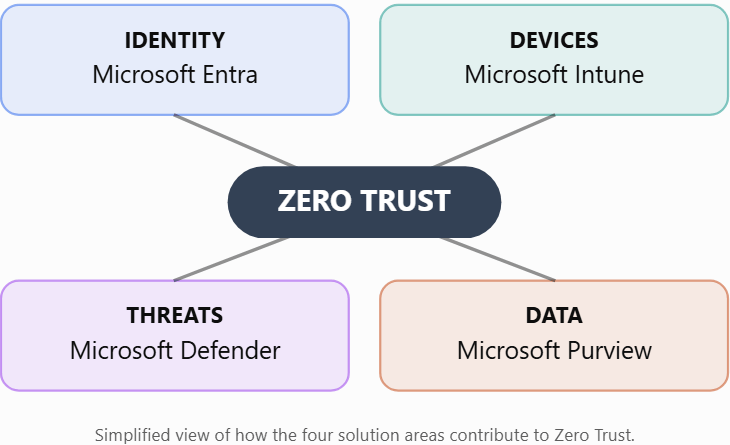
How Microsoft’s security solutions work together to protect identities, endpoints, data, and organizations through Zero Trust
Microsoft Security Architecture | Zero Trust | Defender XDR | Microsoft Purview | Microsoft Entra | Microsoft Intune
Introduction
Microsoft provides a broad portfolio of security solutions designed to protect organizations against modern cyber threats, identity compromise, data breaches, and unauthorized access.
However, navigating the Microsoft security ecosystem can be confusing.
When accessing Microsoft’s administration portals, security professionals frequently encounter four major platforms:
- Microsoft Defender — Security operations and threat protection
- Microsoft Purview — Data security, governance, and compliance
- Microsoft Entra — Identity and access security
- Microsoft Intune — Endpoint management and device security
These platforms address different security challenges, but they are designed to complement one another.
Understanding their responsibilities, integrations, and architectural relationships is essential when designing a modern Microsoft security environment.
In this article, we explore each platform, its core capabilities, practical use cases, and how these technologies contribute to a Zero Trust architecture.
1. Microsoft Defender: Security Operations and Threat Protection
Portal: https://security.microsoft.com
Microsoft Defender is a family of security solutions focused on preventing, detecting, investigating, and responding to cyber threats.
Its extended detection and response platform, Microsoft Defender XDR, correlates security signals across supported endpoints, identities, email, collaboration workloads, and cloud applications.
Core security solutions
| Solution | Primary responsibility |
|---|---|
| Microsoft Defender XDR | Unified threat detection, investigation, and response |
| Defender for Endpoint | Endpoint detection and response, vulnerability management, threat protection |
| Defender for Office 365 | Email and collaboration threat protection |
| Defender for Identity | Hybrid identity threat detection |
| Defender for Cloud Apps | SaaS application security and cloud activity monitoring |
| Microsoft Sentinel | Cloud-native SIEM and SOAR capabilities |
Microsoft Sentinel is a distinct product, but it integrates with Defender XDR to provide unified security operations.
Practical scenario: Detecting a compromised account
Consider an attacker who compromises the credentials of finance@muggh.com.
The attacker signs in from an unfamiliar location and attempts to access confidential documents.
Several Microsoft security services can contribute to the investigation:
- Microsoft Entra ID Protection evaluates supported sign-in and user-risk signals.
- Defender for Identity may detect suspicious activity involving hybrid identity infrastructure.
- Defender for Cloud Apps can provide visibility into supported cloud application activities.
- Defender XDR correlates relevant security alerts into incidents.
- Microsoft Sentinel can extend investigation across additional cloud, on-premises, and third-party data sources.
Key takeaway: Microsoft Defender focuses primarily on identifying and responding to threats against the organization.
2. Microsoft Purview: Data Security, Governance, and Compliance
Portal: https://purview.microsoft.com
Microsoft Purview helps organizations discover, classify, protect, and govern sensitive information.
While Microsoft Defender focuses on threats, Microsoft Purview focuses on the security and responsible management of data.
Core capabilities
| Solution | Primary responsibility |
|---|---|
| Information Protection | Sensitivity labels, classification, and protection |
| Data Loss Prevention | Detecting and controlling sensitive data movement |
| Insider Risk Management | Identifying potentially risky user activities |
| Data Security Posture Management | Visibility into data security posture and risks |
| Audit | Investigating supported Microsoft 365 activities |
| eDiscovery | Identifying and managing electronically stored information for investigations |
| Communication Compliance | Identifying communication policy risks |
| Data Lifecycle Management | Managing retention and deletion |
Practical scenario: Preventing confidential data leakage
An employee attempts to email a document labeled Confidential to an external recipient.
Microsoft Purview can help protect the information through several mechanisms.
Step 1 — Classification
A sensitivity label identifies the document as Confidential.
Step 2 — Data Loss Prevention
A DLP policy evaluates the message and its content against configured conditions.
Depending on the policy, DLP may block the message, notify the user, or generate an alert.
Step 3 — Insider Risk Management
If the organization has configured a relevant IRM policy, supported data movement or DLP indicators may contribute to the user’s risk evaluation.
Step 4 — Investigation
Authorized analysts can review relevant DLP alerts, audit events, and insider-risk activities through the appropriate Purview experiences.
Important distinction
Sensitivity labels and DLP policies are not interchangeable.
A sensitivity label classifies and may protect content. DLP evaluates activities and conditions to apply data protection controls.
Key takeaway: Microsoft Purview protects sensitive information throughout its lifecycle, including data used by supported AI applications and services.
3. Microsoft Entra: Identity and Access Security
Portal: https://entra.microsoft.com
Microsoft Entra is Microsoft’s identity and network access security family.
Its central identity service, Microsoft Entra ID, provides authentication, authorization, and identity management for users, applications, devices, and workloads.
Core solutions
| Solution | Primary responsibility |
|---|---|
| Microsoft Entra ID | Identity and access management |
| Conditional Access | Risk-aware access policy enforcement |
| Identity Protection | Identity risk detection and remediation |
| Privileged Identity Management | Just-in-time privileged access |
| Entra ID Governance | Identity lifecycle and access governance |
| Entra Private Access | Zero Trust access to private applications |
| Entra Internet Access | Identity-aware internet and SaaS access security |
Practical scenario: Blocking risky access
A user attempts to access Microsoft 365 from an unfamiliar device.
Microsoft Entra Conditional Access can evaluate supported signals such as:
- User identity
- Application being accessed
- Device compliance
- Sign-in risk
- User risk
- Location and other supported conditions
Based on the configured policy, Microsoft Entra can require multifactor authentication, require a compliant device, or block access.
For example, a Conditional Access policy might require a compliant device when accessing SharePoint Online.
If the device does not meet the requirement, access can be denied.
Key takeaway: Microsoft Entra determines who can access organizational resources and under what conditions.
4. Microsoft Intune: Endpoint Management and Security
Portal: https://intune.microsoft.com
Microsoft Intune is Microsoft’s cloud-based endpoint management platform.
It helps organizations manage devices, deploy applications, enforce configuration requirements, and assess device compliance.
Core capabilities
| Capability | Primary responsibility |
|---|---|
| Device enrollment | Registering and managing devices |
| Compliance policies | Evaluating device compliance |
| Configuration profiles | Enforcing device settings |
| Endpoint security policies | Managing supported endpoint security configurations |
| Application management | Deploying and protecting applications |
| Windows Autopilot | Provisioning Windows devices |
| Security baselines | Applying recommended configuration settings |
Practical scenario: Securing an employee workstation
An employee uses a Windows laptop to access corporate information.
Microsoft Intune can:
- Enroll the laptop.
- Enforce security configuration requirements.
- Evaluate device compliance.
- Deploy and manage supported applications.
- Integrate compliance information with Microsoft Entra Conditional Access.
Microsoft Defender for Endpoint can separately provide threat detection and endpoint response capabilities.
Microsoft Purview Endpoint DLP can apply data protection controls on supported, onboarded devices.
Important distinction: Intune vs. Defender for Endpoint
Intune and Defender for Endpoint both contribute to endpoint security, but they serve different purposes.
Intune: Manages device configuration, applications, and compliance.
Defender for Endpoint: Detects and responds to endpoint threats.
They complement one another rather than replace each other.
5. Comparing the Four Platforms
| Security requirement | Primary Microsoft platform |
|---|---|
| Detect ransomware | Defender |
| Investigate security incidents | Defender |
| Protect sensitive documents | Purview |
| Prevent sensitive data leakage | Purview |
| Detect potential insider risks | Purview |
| Enforce multifactor authentication | Entra |
| Control privileged access | Entra |
| Manage employee laptops | Intune |
| Enforce device compliance | Intune |
| Coordinate SIEM and SOC operations | Sentinel and Defender |
This comparison identifies primary responsibilities. Some capabilities span multiple platforms, and integrations depend on licensing and configuration.
6. How the Four Platforms Work Together
Consider a financial services organization using Microsoft 365.
An employee needs access to confidential financial reports stored in SharePoint Online.
The organization wants to ensure that:
- Only authorized users can access the reports.
- Corporate devices meet security requirements.
- Sensitive documents remain protected.
- Suspicious activities can be detected and investigated.
A coordinated architecture might operate as follows.
Step 1 — Identity verification with Microsoft Entra
The employee signs in using Microsoft Entra ID.
Conditional Access evaluates authentication and relevant access conditions.
Step 2 — Device compliance with Microsoft Intune
Intune evaluates whether the employee’s managed workstation meets configured compliance requirements.
Microsoft Entra can use the resulting compliance signal during access evaluation.
Step 3 — Data protection with Microsoft Purview
The confidential report is classified and labeled.
A DLP policy evaluates supported sharing and transfer activities.
If a prohibited action occurs, the configured policy may block it or generate an alert.
Step 4 — Threat monitoring with Microsoft Defender
Defender for Endpoint monitors the device for supported malicious activity.
Defender XDR correlates relevant alerts from integrated security workloads.
Step 5 — Security operations with Microsoft Sentinel
Microsoft Sentinel can ingest supported security data, correlate events, and support investigation and automated response workflows.
The result is a layered architecture in which identity, device, data, and threat protection controls reinforce one another.
7. How These Solutions Support Zero Trust
Zero Trust is a security strategy built around three fundamental principles:
Verify explicitly: Authenticate and authorize access using relevant available signals.
Use least-privilege access: Limit access to what users and workloads require.
Assume breach: Design controls to limit the impact of a potential compromise.
Microsoft’s Zero Trust architecture extends across multiple technology areas.
| Zero Trust area | Example Microsoft solutions |
|---|---|
| Identities | Microsoft Entra, Defender for Identity |
| Endpoints | Microsoft Intune, Defender for Endpoint |
| Data | Microsoft Purview |
| Applications | Defender for Cloud Apps, Microsoft Entra |
| Infrastructure | Microsoft Defender for Cloud |
| Networks | Microsoft Entra Global Secure Access, Azure network security |
| Security operations | Defender XDR, Microsoft Sentinel |
The four platforms discussed in this article are important contributors, but they do not represent the complete Zero Trust architecture.
Applications, infrastructure, networking, and security operations must also be considered.
8. What About Microsoft Defender for Cloud and Microsoft Sentinel?
Two additional solutions deserve particular attention.
Microsoft Defender for Cloud
Microsoft Defender for Cloud provides cloud security posture management and cloud workload protection capabilities across supported cloud environments.
It helps organizations identify cloud security misconfigurations, assess security posture, and protect workloads such as servers, containers, and databases.
Portals: Azure portal and supported Microsoft Defender portal experiences.
Microsoft continues to expand Defender for Cloud capabilities within the Defender portal.
Microsoft Sentinel
Microsoft Sentinel is Microsoft’s cloud-native security information and event management (SIEM) solution.
It supports security data collection, analytics, threat detection, investigation, and automation.
Microsoft Sentinel is available in the Microsoft Defender portal, enabling organizations to combine SIEM and XDR workflows.
Microsoft documentation states that support for Microsoft Sentinel in the Azure portal ends after March 31, 2027.
Organizations using the Azure portal should plan their transition accordingly.
9. Recommended Enterprise Security Architecture
For organizations deploying Microsoft security technologies, I recommend designing security controls around business requirements rather than individual product portals.
A practical implementation approach includes:
Phase 1 — Identity foundation
Establish strong authentication, Conditional Access, privileged access controls, and identity governance.
Phase 2 — Endpoint security
Deploy endpoint management, device compliance, endpoint threat protection, and secure configuration policies.
Phase 3 — Data security
Implement data discovery, classification, sensitivity labels, DLP, and appropriate insider-risk controls.
Phase 4 — Security operations
Integrate relevant threat detection services, incident management, Microsoft Sentinel, and security automation.
Phase 5 — Continuous improvement
Regularly assess control effectiveness, detection coverage, configuration drift, licensing, and operational processes.
This is a recommended implementation sequence, not a mandatory Microsoft deployment order. The actual roadmap should depend on the organization’s risks and existing capabilities.
10. Common Architectural Mistakes to Avoid
Mistake 1: Assuming Microsoft Defender replaces Microsoft Purview
Threat protection and data protection address different security problems.
Mistake 2: Treating Intune as a complete endpoint detection and response solution
Intune provides endpoint management and security configuration. Defender for Endpoint provides dedicated EDR capabilities.
Mistake 3: Assuming Conditional Access protects the contents of a document after it is accessed
Conditional Access governs access decisions. Persistent data protection requires appropriate information protection and data security controls.
Mistake 4: Deploying every Microsoft security product without an integration strategy
Products should be selected based on security requirements, licensing, dependencies, and operational maturity.
Mistake 5: Assuming the four administration portals represent every Microsoft security capability
Cloud workload protection, network security, application security, and other specialized capabilities may involve additional products and management experiences.
Conclusion
Microsoft Defender, Microsoft Purview, Microsoft Entra, and Microsoft Intune represent four important solution families within Microsoft’s security and management ecosystem.
Each platform has a distinct primary responsibility:
- Microsoft Defender: Detect and respond to threats.
- Microsoft Purview: Protect and govern sensitive data.
- Microsoft Entra: Secure identities and control access.
- Microsoft Intune: Manage and secure endpoints.
Together with Microsoft Sentinel, Defender for Cloud, and other Microsoft security technologies, they provide the building blocks for an integrated Zero Trust security architecture.
The objective is not simply to deploy multiple Microsoft security products.
It is to ensure that identity, endpoint, data, cloud, and security operations controls work together to reduce risk and improve organizational resilience.
A strong Microsoft security architecture is built on integrated controls, not isolated products.

